![[PukiWiki]](image/pukiwiki.png "[PukiWiki]")
「Open棟梁 wiki」は、「Open棟梁Project」,「OSSコンソーシアム .NET開発基盤部会」によって運営されています。
汎用認証サイト(Multi-purpose Authentication Site)
の導入前の評価を行うためのファーストステップガイド。
(4) では、「認証連携コードの実装」を行う。
ココで実装するコートは、
下記に添付した、
 WebApplication1.zipWebApplication2.zip
からダウンロード可能です。
ここでは、クライアントのプロジェクトとして、ASP.NET MVCを選択する。
ASP.NET MVCの(ASP.NET Web Application)プロジェクトを新規作成する。
[メニュー] ---> [新規作成] --->
[プロジェクト] ---> [ASP.NET Web Application(.NET Framework)]
テンプレート選択画面で以下のように選択する。
HomeController?から以下のアクション・メソッドを削除
/Home/About.cshtml
/Home/Contact.cshtml
<div class="navbar navbar-inverse navbar-fixed-top">
<div class="container body-content">
@RenderBody()
<!DOCTYPE html>
<html>
<head>
<meta http-equiv="Content-Type" content="text/html; charset=utf-8"/>
    <meta charset="utf-8" />
    <meta name="viewport" content="width=device-width, initial-scale=1.0">
    <title>@ViewBag.Title - マイ ASP.NET アプリケーション</title>
    @Styles.Render("~/Content/css")
    @Scripts.Render("~/bundles/modernizr")
</head>
<body>
    @RenderBody()

    @Scripts.Render("~/bundles/jquery")
    @Scripts.Render("~/bundles/bootstrap")
    @RenderSection("scripts", required: false)
</body>
</html>
/Home/Index.cshtml
@{
    ViewBag.Title = "Home Page";
}汎用認証サイトのAccountControllerからサンプルのRedirectエンドポイントである
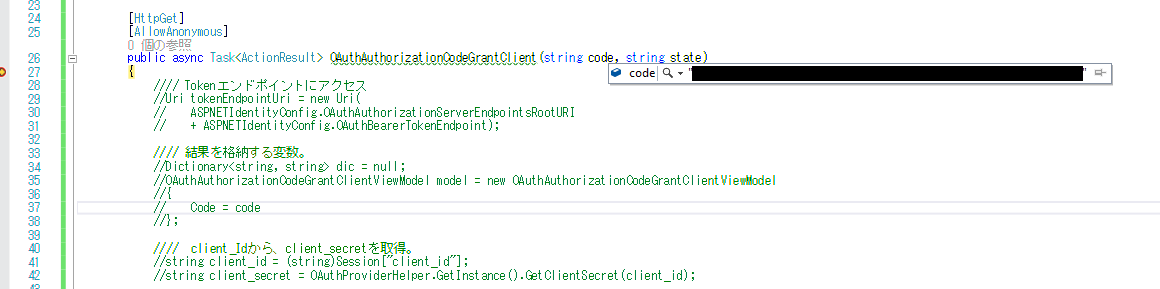
AccountController.OAuthAuthorizationCodeGrantClientアクション・メソッドをコピーする。
AccountController.OAuthImplicitGrantClientアクション・メソッドをコピーする。
[HttpGet]
[AllowAnonymous]
public async Task<ActionResult> OAuthAuthorizationCodeGrantClient(string code, string state)
{
    // ・・・コメントアウト・・・

    return View("");
}[HttpGet]
[AllowAnonymous]
public async Task<ActionResult> OAuthImplicitGrantClient(string code, string state)
{
// ・・・コメントアウト・・・
return View("");
}"f53469c17c5a432f86ce563b7805ab89": {
"client_secret": "cKdwJb6mRKVIJpGxEWjIC94zquQltw_ECfO-55p21YM",
"redirect_uri_code": "http://(MVCクライアント・サイトのアドレス:ポート)/Home/OAuthAuthorizationCodeGrantClient",
"redirect_uri_token": "http://(MVCクライアント・サイトのアドレス:ポート)/Home/OAuthImplicitGrantClient",
"client_name": "hogehoge0"
},
"b6b393fe861b430eb4ee061006826b03": {
"client_secret": "p2RgAFKF-JaF0A9F1tyDXp4wMq-uQZYyvTBM8wr_v8g",
"redirect_uri_code": "http://(WebFormクライアント・サイトのアドレス:ポート)/OAuthAuthorizationCodeGrantClient.aspx",
"redirect_uri_token": "http://(WebFormクライアント・サイトのアドレス:ポート)/OAuthImplicitGrantClient.aspx",
"client_name": "hogehoge1"
},http://(汎用認証サイトのアドレス:ポート)/MultiPurposeAuthSite/Account/OAuthAuthorize?client_id=67d328bfe8604aae83fb15fa44780d8b&response_type=code&scope=profile%20email%20phone%20address%20userid%20aaa%20bbb&state=vj9NCxij4L
http://(汎用認証サイトのアドレス:ポート)/MultiPurposeAuthSite/Account/OAuthAuthorize?client_id=67d328bfe8604aae83fb15fa44780d8b&response_type=token&scope=profile%20email%20phone%20address%20userid%20aaa%20bbb&state=vj9NCxij4L
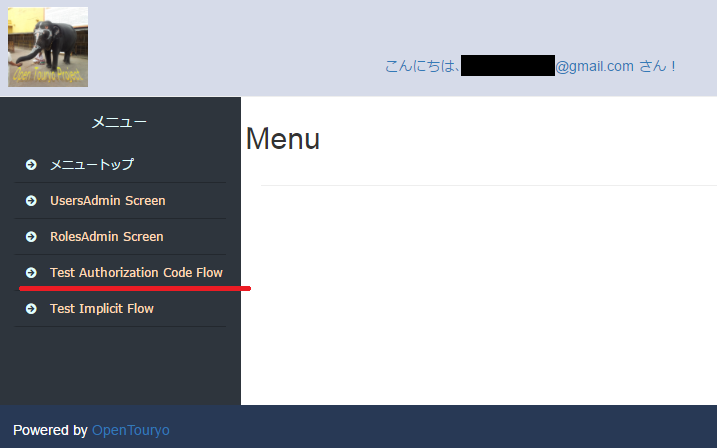
http://(汎用認証サイトのアドレス:ポート)/MultiPurposeAuthSite/Account/OAuthAuthorize?client_id=f53469c17c5a432f86ce563b7805ab89&response_type=code&scope=profile%20email%20phone%20address%20userid%20aaa%20bbb&state=vj9NCxij4L
http://(汎用認証サイトのアドレス:ポート)/MultiPurposeAuthSite/Account/OAuthAuthorize?client_id=f53469c17c5a432f86ce563b7805ab89&response_type=token&scope=profile%20email%20phone%20address%20userid%20aaa%20bbb&state=vj9NCxij4L
<a href="http://(汎用認証サイトのアドレス:ポート)/MultiPurposeAuthSite/Account/OAuthAuthorize?client_id=f53469c17c5a432f86ce563b7805ab89&response_type=code&scope=profile%20email%20phone%20address%20userid%20aaa%20bbb&state=vj9NCxij4L">開始(code)</a><br/>
<a href="http://localhost:63359/MultiPurposeAuthSite/Account/OAuthAuthorize?client_id=b6b393fe861b430eb4ee061006826b03&response_type=code&scope=profile%20email%20phone%20address%20userid%20aaa%20bbb&state=vj9NCxij4L">開始(code)</a><br/>
<a href="http://(汎用認証サイトのアドレス:ポート)/MultiPurposeAuthSite/Account/OAuthAuthorize?client_id=f53469c17c5a432f86ce563b7805ab89&response_type=token&scope=profile%20email%20phone%20address%20userid%20aaa%20bbb&state=vj9NCxij4L">開始(token)</a><br />
<a href="http://localhost:63359/MultiPurposeAuthSite/Account/OAuthAuthorize?client_id=b6b393fe861b430eb4ee061006826b03&response_type=token&scope=profile%20email%20phone%20address%20userid%20aaa%20bbb&state=vj9NCxij4L">開始(token)</a><br />
によって、仲介コードを
変換する。
なお、この処理は、Authorization Codeでのみ必要になる。
以下を必要とする。
POST /token HTTP/1.1
 Host: server.example.com
 Authorization: Basic czZCaGRSa3F0MzpnWDFmQmF0M2JW
 Content-Type: application/x-www-form-urlencoded

 grant_type=authorization_code&code=SplxlOBeZQQYbYS6WxSbIA
 &redirect_uri=https%3A%2F%2Fclient%2Eexample%2Ecom%2Fcb
POST /MultiPurposeAuthSite/OAuthBearerToken
HTTP/1.1
 Host: (汎用認証サイトのアドレス:ポート)
 Authorization: Basic ["client_Id:client_secret"をbase64 url encodeした値]
 Content-Type: application/x-www-form-urlencoded

 grant_type=authorization_code&code=[取得した仲介コードの値]
http://(汎用認証サイトのアドレス:ポート)/MultiPurposeAuthSite/OAuthBearerToken
を利用する。
http://(クライアント・サイトのアドレス:ポート)/Home/OAuthAuthorizationCodeGrantClient
だいたい、以下のような感じのコードになる。
using System;
using System.Text;
using System.Collections.Generic;
using System.Web.Mvc;
using System.Net.Http;
using System.Net.Http.Headers;
using System.Threading.Tasks;

using Microsoft.Owin.Security.DataHandler.Encoder;

using Newtonsoft.Json;
using Newtonsoft.Json.Linq;

namespace WebApplication1.Controllers
{
    public class HomeController : Controller
    {
        public ActionResult Index()
        {
            return View();
        }

        [HttpGet]
        [AllowAnonymous]
        public async Task<ActionResult> OAuthAuthorizationCodeGrantClient(string code, string state)
        {
            if (state == "vj9NCxij4L") // CSRF(XSRF)対策のstateの検証は重要
            {
                HttpClient httpClient = new HttpClient();

                HttpRequestMessage httpRequestMessage = null;
                HttpResponseMessage httpResponseMessage = null;

                // HttpRequestMessage (Method & RequestUri)
                httpRequestMessage = new HttpRequestMessage
                {
                    Method = HttpMethod.Post,
                    RequestUri = new Uri("http://(汎用認証サイトのアドレス:ポート)/MultiPurposeAuthSite/OAuthBearerToken"),
                };

                // HttpRequestMessage (Headers & Content)
                httpRequestMessage.Headers.Authorization = new AuthenticationHeaderValue(
                    "Basic",
                    Convert.ToBase64String(System.Text.Encoding.ASCII.GetBytes(
                        string.Format("{0}:{1}",
                            "f53469c17c5a432f86ce563b7805ab89",
                            "cKdwJb6mRKVIJpGxEWjIC94zquQltw_ECfO-55p21YM"))));

                httpRequestMessage.Content = new FormUrlEncodedContent(
                    new Dictionary<string, string>
                    {
                        { "grant_type", "authorization_code" },
                        { "code", code },
                        { "redirect_uri", System.Web.HttpUtility.HtmlEncode("http://(クライアント・サイトのアドレス:ポート)/Home/OAuthAuthorizationCodeGrantClient") },
                    });

                // HttpResponseMessage
                httpResponseMessage = await httpClient.SendAsync(httpRequestMessage);
                string response = await httpResponseMessage.Content.ReadAsStringAsync();

                // 汎用認証サイトのOAuth2.0のレスポンスに含まれるaccess_tokenは、id_tokenのようなformatをしている。ここからsubを取得可能。
                Base64UrlTextEncoder base64UrlEncoder = new Base64UrlTextEncoder();
                Dictionary<string, string> dic = JsonConvert.DeserializeObject<Dictionary<string, string>>(response);
                string jwtPayload = Encoding.UTF8.GetString(base64UrlEncoder.Decode(dic["access_token"].Split('.')[1]));

                // id_tokenライクなJWTなので、中からsubなどを取り出すことができる。
                JObject jobj = ((JObject)JsonConvert.DeserializeObject(jwtPayload));
                string sub = (string)jobj["sub"];
            }

            return View("");
        }

    }
}
上記の、「dic["access_token"]」の部分が、アクセストークンである。
汎用認証サイトでは、設定によってアクセストークンのformatを、ASP.NET Identity形式とJWT形式から選択できる。
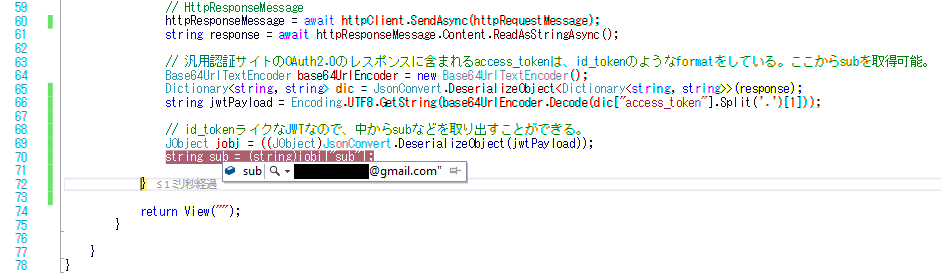
アクセストークンのformatgが、JWT形式の場合、
必要に応じて、JWTの署名検証、内容検証を行えば、セキュリティ的に、より確実と言える。
http://(汎用認証サイトのアドレス:ポート)/MultiPurposeAuthSite/userinfo
using System;
using System.Text;
using System.Collections.Generic;
using System.Web.Mvc;
using System.Net.Http;
using System.Net.Http.Headers;
using System.Threading.Tasks;

using Microsoft.Owin.Security.DataHandler.Encoder;

using Newtonsoft.Json;
using Newtonsoft.Json.Linq;

namespace WebApplication1.Controllers
{
    public class HomeController : Controller
    {
        public ActionResult Index()
        {
            return View();
        }

        [HttpGet]
        [AllowAnonymous]
        public async Task<ActionResult> OAuthAuthorizationCodeGrantClient(string code, string state)
        {
            if (state == "vj9NCxij4L") // CSRF(XSRF)対策のstateの検証は重要
            {
                HttpClient httpClient = new HttpClient();

                HttpRequestMessage httpRequestMessage = null;
                HttpResponseMessage httpResponseMessage = null;

                // HttpRequestMessage (Method & RequestUri)
                httpRequestMessage = new HttpRequestMessage
                {
                    Method = HttpMethod.Post,
                    RequestUri = new Uri("http://(汎用認証サイトのアドレス:ポート)/MultiPurposeAuthSite/OAuthBearerToken"),
                };

                // HttpRequestMessage (Headers & Content)
                httpRequestMessage.Headers.Authorization = new AuthenticationHeaderValue(
                    "Basic",
                    Convert.ToBase64String(System.Text.Encoding.ASCII.GetBytes(
                        string.Format("{0}:{1}",
                            "f53469c17c5a432f86ce563b7805ab89",
                            "cKdwJb6mRKVIJpGxEWjIC94zquQltw_ECfO-55p21YM"))));

                httpRequestMessage.Content = new FormUrlEncodedContent(
                    new Dictionary<string, string>
                    {
                        { "grant_type", "authorization_code" },
                        { "code", code },
                        { "redirect_uri", System.Web.HttpUtility.HtmlEncode("http://(クライアント・サイトのアドレス:ポート)/Home/OAuthAuthorizationCodeGrantClient") },
                    });

                // HttpResponseMessage
                httpResponseMessage = await httpClient.SendAsync(httpRequestMessage);
                string response = await httpResponseMessage.Content.ReadAsStringAsync();

                // 汎用認証サイトのOAuth2.0のレスポンスに含まれるaccess_tokenは、id_tokenのようなformatをしている。ここからsubを取得可能。
                Base64UrlTextEncoder base64UrlEncoder = new Base64UrlTextEncoder();
                Dictionary<string, string> dic = JsonConvert.DeserializeObject<Dictionary<string, string>>(response);
                string jwtPayload = Encoding.UTF8.GetString(base64UrlEncoder.Decode(dic["access_token"].Split('.')[1]));

                // id_tokenライクなJWTなので、中からsubなどを取り出すことができる。
                JObject jobj = ((JObject)JsonConvert.DeserializeObject(jwtPayload));
                string sub = (string)jobj["sub"];
↓↓↓ 下を追加 ↓↓↓
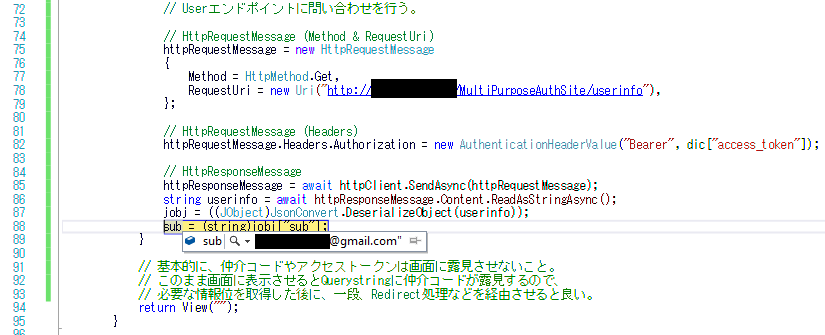
                // Userエンドポイントに問い合わせを行う。

                // HttpRequestMessage (Method & RequestUri)
                httpRequestMessage = new HttpRequestMessage
                {
                    Method = HttpMethod.Get,
                    RequestUri = new Uri("http://(汎用認証サイトのアドレス:ポート)/MultiPurposeAuthSite/userinfo"),
                };

                // HttpRequestMessage (Headers)
                httpRequestMessage.Headers.Authorization = new AuthenticationHeaderValue("Bearer", dic["access_token"]);

                // HttpResponseMessage
                httpResponseMessage = await httpClient.SendAsync(httpRequestMessage);
                string userinfo = await httpResponseMessage.Content.ReadAsStringAsync();
                jobj = ((JObject)JsonConvert.DeserializeObject(userinfo));
                sub = (string)jobj["sub"];
            }

            // 基本的に、仲介コードやアクセストークンは画面に露見させないこと。
            // このまま画面に表示させるとQuerystringに仲介コードが露見するので、
            // 必要な情報位を取得した後に、一段、Redirect処理などを経由させると良い。
↑↑↑ 上を追加 ↑↑↑
            return View("");
        }

    }
}
前述のAuthorization Codeグラント種別と異なり、
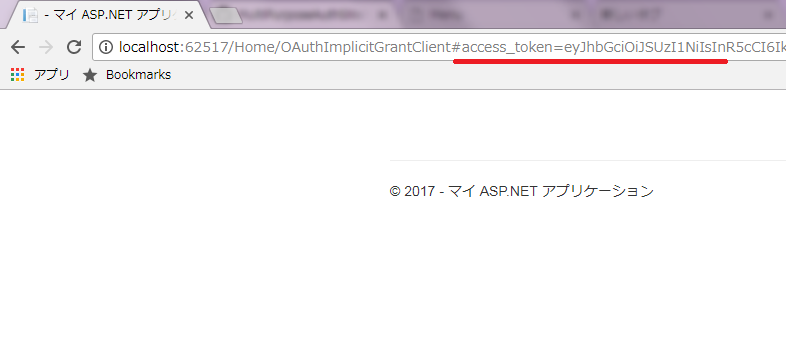
この後の処理をクライアントサイドのJavaScript?で行う。
前述と同じ。
以下のモジュールから、
以下のようにOAuthImplicitGrantClient?.cshtmlにコードを移植する。
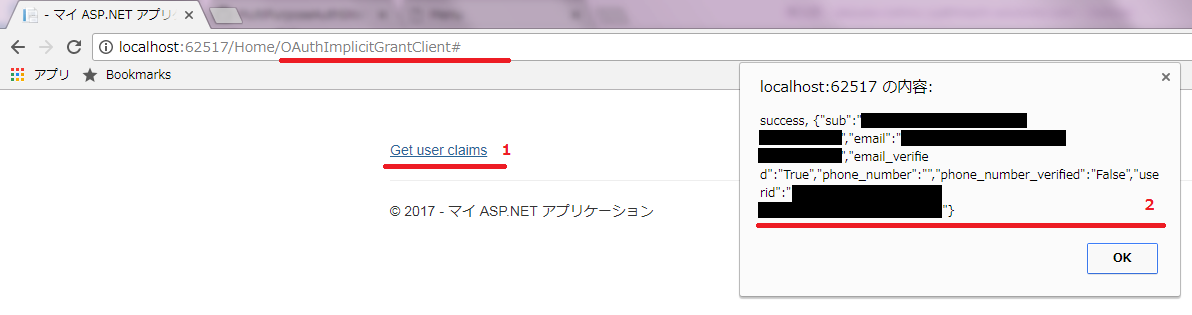
<a href="#" id="OAuthGetUserClaimsWebAPI" url="http://(汎用認証サイトのアドレス:ポート)/MultiPurposeAuthSite/userinfo">Get user claims</a>

@section scripts{
    <script type="text/javascript">

        var fragment = "";
        var token = "";

        function CallOAuthAPI(url, httpMethod, postdata) {
            alert(
                "<httpMethod>" + "\n" + httpMethod + "\n" +
                "<url>" + "\n" + url + "\n" +
                "<token>" + "\n" + token);

            $.ajax({
                type: httpMethod,
                url: url,
                crossDomain: true,
                headers: {
                    'Authorization': 'Bearer ' + token
                },
                data: postdata,
                xhrFields: {
                    withCredentials: true
                },
                success: function (responseData, textStatus, jqXHR) {
                    alert(textStatus + ', ' + JSON.stringify(responseData));
                },
                error: function (responseData, textStatus, errorThrown) {
                    alert(textStatus + ', ' + errorThrown.message);
                }
            });
        }

        $(function () {
            // フラグメントを取得し、
            fragment = getFragment();
            // フラグメントに access_token (Bearer Token) がある場合、
            if (fragment.access_token) {

                // access_token (Bearer Token) を使用して
                // ResourceServerのWebAPIにアクセスする。
                token = fragment.access_token;

                // 「access_token」(Bearer Token)が
                // "露見"しないようwindow.location.hashを消去。
                // ~~~~~~
                window.location.hash = fragment.state || '';

                // OAuthGetUserClaimsWebAPI
                $('#OAuthGetUserClaimsWebAPI').on('click', function () {
                    CallOAuthAPI($('#OAuthGetUserClaimsWebAPI').attr("url"), 'get', null)
                });
            }
        });

        // -----------------------------------------------------------
        // フラグメント(#~の部分)を取得する。
        // -----------------------------------------------------------
        function getFragment() {
            // URLの「#」記号の後の部分を取得し、
            if (window.location.hash.indexOf("#") === 0) {
                // # が1文字目にある場合
                // 2文字目以降をobjectにparse。
                return parseQueryString(window.location.hash.substr(1));
            } else {
                // そうではない場合。
                return {}; // 空
            }
        };

        // -----------------------------------------------------------
        // QueryStringをobjectにparseする。
        // -----------------------------------------------------------
        function parseQueryString(queryString) {
            //alert(queryString);
            var data = {},
                pairs, pair, separatorIndex, escapedKey, escapedValue, key, value;

            if (queryString === null) {
                return data; // 空で返す。
            }

            // 分解して、
            pairs = queryString.split("&");

            // 詰めて、
            for (var i = 0; i < pairs.length; i++) {
                pair = pairs[i];
                separatorIndex = pair.indexOf("=");

                if (separatorIndex === -1) {
                    escapedKey = pair;
                    escapedValue = null;
                } else {
                    escapedKey = pair.substr(0, separatorIndex);
                    escapedValue = pair.substr(separatorIndex + 1);
                }

                key = decodeURIComponent(escapedKey);
                value = decodeURIComponent(escapedValue);

                // インデクサで。
                data[key] = value;
            }

            // 返す。
            return data;
        }

    </script>
}URLフラグメントを使用するため、Authorization Codeグラント種別と比べ、
非常に、アクセストークンが画面に露見し易いので注意する。
OpenID ConnectのAuthorization Code Flowをテストする。
上記のスターターのScopeにopenidを加えるだけで、
OpenID ConnectのAuthorization Code Flowをテストできる。
<a href="http://(汎用認証サイトのアドレス:ポート)/MultiPurposeAuthSite/Account/OAuthAuthorize?client_id=f53469c17c5a432f86ce563b7805ab89&response_type=code&scope=profile%20email%20phone%20address%20userid%20aaa%20openid&state=vj9NCxij4L">開始</a>
OpenID ConnectのImplicit Flowをテストする。
Implicit Flowでは、Scopeにopenidを加えるだけでなく、
response_typeを、response_type=id_token token, id_tokenに変更する必要がある。
<a href="http://(汎用認証サイトのアドレス:ポート)/MultiPurposeAuthSite/Account/OAuthAuthorize?client_id=f53469c17c5a432f86ce563b7805ab89&response_type=id_token%20token&scope=profile%20email%20phone%20address%20userid%20aaa%20openid&state=vj9NCxij4L">開始</a>